


iTime – Android Based Mobile Time Attendance System
iTime Mobile Time Attendance System | Android-Based GPS Tracking, Geofencing & Biometric Verification for Field Workforce
What is the iTime Mobile Time Attendance System?
iTime is a powerful, Android-based mobile attendance application that empowers employees to mark their attendance directly from the field using their smartphones. It is specifically designed for the modern, distributed workforce, combining robust biometric verification, precise GPS location tracking with geofencing, and real-time data synchronization to a central server. This comprehensive solution delivers real-time visibility and control over mobile employees, making it the ideal choice for companies with field staff, on-site sales teams, traveling service engineers, and remote workers of all types.
Built as a seamless add-on for cloud-based time attendance systems, iTime leverages web services to ensure your attendance data is always up-to-date, secure, and accessible from anywhere.
Key Features & Benefits of the iTime Mobile Attendance App
Powerful Features for Workforce Management
- Android App-Based Attendance: A user-friendly interface for employees to mark IN/OUT directly from their smartphones, capturing date, time, and GPS location.
- Biometric & PIN Verification: Supports fingerprint, facial recognition, and PIN code authentication to eliminate proxy attendance and buddy punching while confirming the identity of the clocking employee.
- Accurate GPS & Geofencing: Pinpoints the employee's exact location and enforces attendance marking only when they are within a pre-defined virtual boundary. This ensures that employees are where they are supposed to be for their work.
- Selfie-Based Attendance with Anti-Spoofing: Adds an extra layer of security by capturing a photo during clock-in, which can be used to verify the employee's identity and prevent fraudulent entries.
- Offline Mode with Automatic Sync: Employees can reliably mark attendance even in areas with poor or no internet connectivity. The app stores data locally and synchronizes it with the central server as soon as the connection is restored.
- Live Tracking of Field Employees: Managers and administrators can monitor the real-time location of their field workforce, view their location history, and ensure efficient deployment of resources.
- Customizable Attendance Rules & Shift Management: Flexible configuration to match your organization's specific policies, including complex shift schedules, overtime rules, and work hours tracking.
- Detailed Reports & Analytics: Generates comprehensive attendance reports, work hour summaries, leave records, and analytical insights for informed decision-making and performance tracking.
- Integration with Payroll & HR Systems: Directly integrates with existing ERP, HRMS, and payroll software, automating the payroll process by feeding accurate attendance data and significantly reducing manual entry errors.
Strategic Business Benefits
- Eliminates Proxy Attendance (Buddy Punching): Prevents fraudulent time-tracking by authenticating employees through biometrics, selfies, and GPS, ensuring you only pay for hours actually worked.
- Improves Accountability of Mobile Workforce: Promotes a culture of responsibility by providing management with clear, verifiable data on where and when employees are working.
- Reduces Manual Processing Time: Automates the entire attendance lifecycle, from tracking to report generation, freeing up HR and administrative staff to focus on more strategic tasks.
- Provides Real-Time Visibility to Management: Offers a live view of workforce attendance and location, enabling proactive management, better resource allocation, and immediate response to staffing issues.
- Works Seamlessly in Low Network Areas: The robust offline mode ensures that even employees in remote or rural locations can reliably mark their attendance without interruption.
- Highly Cost-Effective Solution: Delivers a powerful, feature-rich system at a fraction of the cost of traditional hardware-based systems, offering excellent return on investment (ROI).
How iTime Works: A Step-by-Step Guide to Mobile Attendance
- Setup & Configuration: Admin configures employee profiles, sets hierarchical rules, defines geofenced locations, and integrates with the existing HRMS/payroll system.
- Attendance Marking from the Field: Employee opens the app, authenticates via PIN/Biometric/Selfie, and clicks IN/OUT. The app captures the GPS location, timestamp, and optionally a photo.
- Real-Time Data Sync & Offline Mode: With internet, data syncs instantly to the cloud server. In offline mode, data is stored locally and auto-syncs when connectivity is restored.
- Self-Service Reporting for Employees: Employees can view their attendance history, punch details, and location maps within the app for full transparency.
- Centralized Management & Analytics: Authorized admins can access the web-based portal to monitor real-time attendance, generate reports, track employees on a map, and manage approvals.
Frequently Asked Questions (FAQ)
How does iTime ensure attendance is genuine and not fake?
What happens if an employee is in an area with poor or no internet connectivity?
Can iTime integrate with our existing payroll or HRMS software?
What is geofencing and how does iTime use it?
Is iTime suitable for businesses with employees working at multiple sites?
Do you provide installation and after-sales support in Pune?
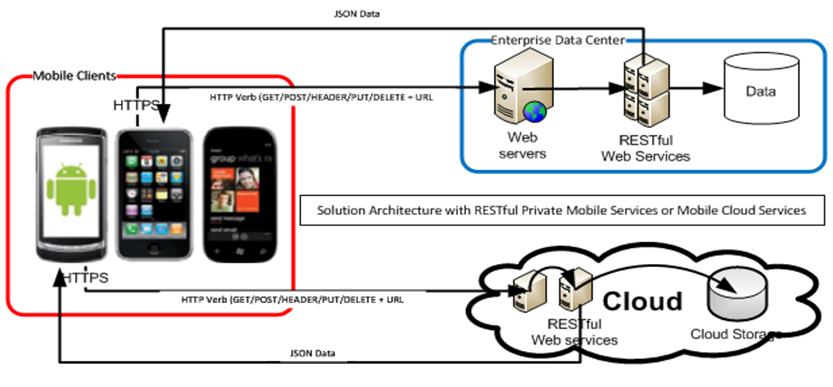
iTime - Architecture
iTime is a mobile app which is designed as an add-on for cloud based time attendance system. The mobile app communicates with the cloud-based server using web services.
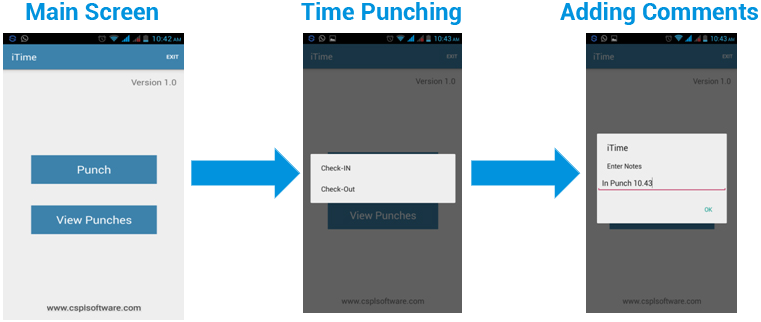
iTime – Attendance Marking from the Field
You can add your In/Out punches from iTime app which sends your current location to server using GPS.
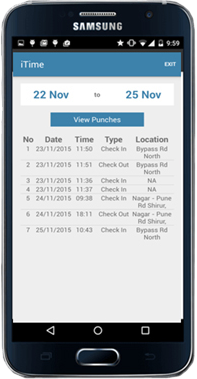
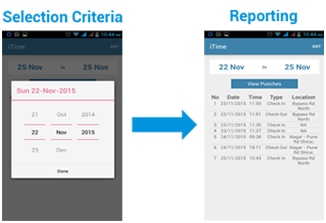
iTime – Self Reporting
Employee can view his attendance report selecting from & to date. The punch details along with location are displayed in the report
Punch Reporting on Centralized Application
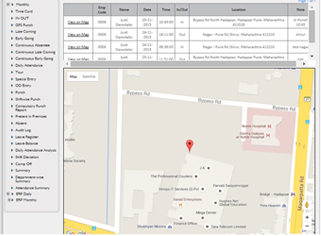
The admin user can log in to the cloud based system & view the punch detail reports for any employee where-in the punch location can also be viewed on map along with other details.
Ready to Transform Your Mobile Workforce Management?
Contact our team today for a free consultation, live product demonstration, or detailed quote!
📞 Sales Inquiry: +91 9028006464
📧 Email Support: sales@csplsoftware.com
Or request a quote at sales@csplsoftware.com