


Asset Tracking Solution for Banks
Background
- There are Assets in the premise at a location
- Barcodes or Tags are to be placed on the Assets
- These Barcodes or Tags are to be Read either by the Handheld or by using ANDROID Mobile Application
- There has to be a facility to change the details of the asset & update on the central server
Desired Solution
There are 3 Type of Assets :
- Asset type where QR Codes are used for Authentication (Eg. Furniture)
- Asset Type where RFID Tags are used for Authentication (eg. Computers, Laptops etc.)
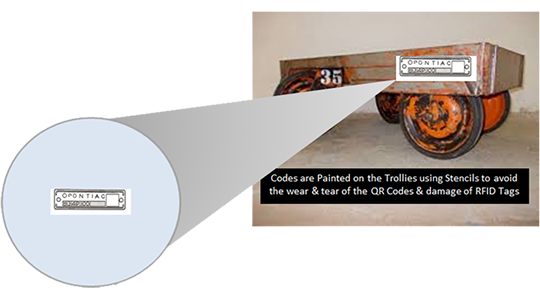
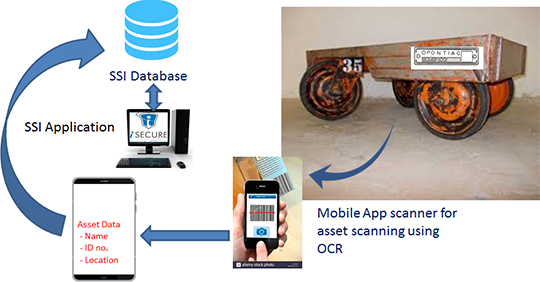
- Asset Type where in the asset is been in use in harsh environment (eg. Engine Trollies)
Solution for Asset type where QR Codes are used for Authentication (Eg. Furniture)
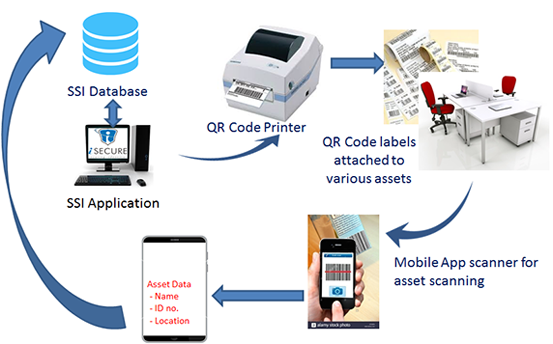
Workflow Understanding with Screen Shots
Asset information is entered in the Centralized application and QR Codes are printed using Printer to be pasted o the Assets
The QR Codes pasted on the Assets can be scanned using ANDROID Mobile App and the details of the assets are accessed from the Central Server for any updations
Barcodes are scanned by Mobile scanner which then display all relevant data of asset. Same data is updated in the Central Server Database
Solution for Asset type where RFID Tags are used for Authentication (Eg. Computers / Laptops)
Adhesive UHF Tag can be used to paste on the Laptop
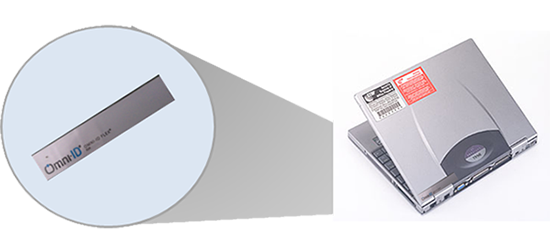
Solution for Asset type where RFID Tags are used for Authentication (Eg. Computers / Laptops)
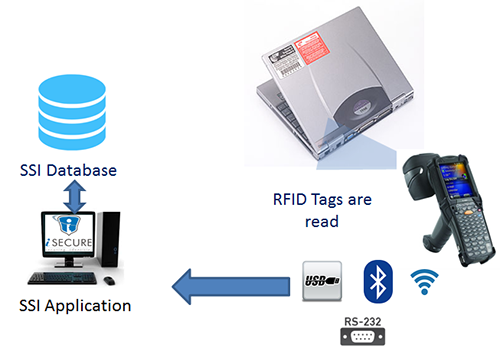
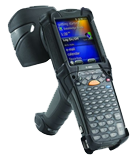
Types of RFID Handheld Terminals
Solution for Asset type where Asset is been used in harsh Environment (Eg. Engine Trollies)
Solution for Asset type where Asset is been used in harsh Environment (Eg. Engine Trollies)
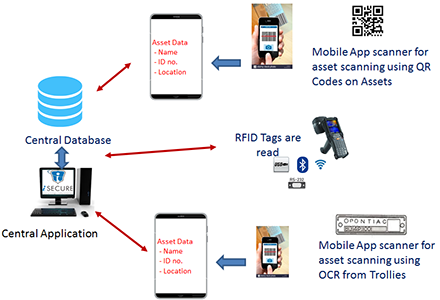
Solution Connectivity with the Central Application Server
Frequently Asked Questions
Q.What asset types does the bank asset tracking solution cover?
The solution handles three types: furniture (QR code tags scanned by Android app), computers and laptops (adhesive UHF RFID tags), and assets in harsh environments like engine trollies (industrial RFID tags).
Q.How does QR code-based asset tracking work?
QR codes are printed and affixed to assets. Staff scan them with the Android mobile app, which retrieves asset details from the central server and allows update of asset condition, location, and other attributes.
Q.What RFID handheld devices are used?
The solution supports Motorola UHF handheld readers with RS232/USB connectivity for wired scanning, and Motorola UHF WiFi/Bluetooth handheld readers for wireless mobile scanning across large bank premises.
Q.How is the central database updated?
Scanning via the Android app or handheld RFID reader immediately updates the central application server database — ensuring all asset records are current without manual data entry.
Q.Can the asset tracking solution integrate with bank ERP systems?
Yes. Cybernetics can develop integration between the asset tracking solution and existing bank ERP or IT asset management systems. Contact Cybernetics on 9028006464 to discuss specific integration requirements.